
UltraDefrag
7.1.2
Size: 2.28 MB
Downloads: 5770
Platform: Windows (All Versions)

Defragmenting your drives is one of those maintenance tasks you have to do if you want your computer to function at optimum performance. There is a default defragmenter that Microsoft built into the Windows operating system, but if you don’t want to use the default, there are many other alternatives to try. One of them is the open source, incredibly easy to use, and efficient defragmenting tool UltraDefrag. It will analyze the drive you specify, identify fragmented data, and defragment it in no time at all.
Installing UltraDefrag on a Windows PC is a standard process, meaning you will have to download an executable (a 477Kb one in this case), run it, and go through a setup wizard. The UltraDefrag setup wizard invites you to choose between a Full, Micro Edition, and a Custom installation. The Full Installation includes the following: UltraDefrag core files, interfaces, documentation, context menu handler, and shortcuts. The setup wizard also asks you to pick one of many, many supported languages. To switch to another language after the installation process, you need only open the defragmenter and go to the Settings menu.
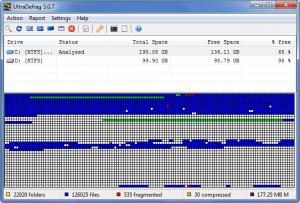
There’s nothing complicated about UltraDefrag's interface: there’s a bar with buttons for various functions the application can perform, a pane that displays your drives (removable drives are skipped by default), and beneath it another pane that displays the status of an analyzed drive. Even if you’ve never used a defragmenting tool before, it shouldn't take long to get accustomed to UltraDefrag’s interface.
There are two main things you are going to love about UltraDefrag: the ease of use and the speed. To enjoy the functionality UltraDefrag has to offer, you need only select a drive and click a button – the Analyze button that will analyze the drive for fragmented data, the Defrag button that will defragment the drive, or the Quick Optimization and Full Optimization buttons that process fragmented files. If you’d rather press a key than click, you will be glad to know that using the Analyze, Defrag and Optimization features can also be done by pressing a hotkey. Press F5, for example, to analyze a drive and F6 to defragment it. Once the defragmentation process starts, it won’t take long for it to complete. So as I was saying, UltraDefrag is easy to use and it does its job fast.
As UltraDefrag is an open source tool, you won’t have to part with your money to use it.
UltraDefrag, a powerful and easy to use defrag utility, is a must for any user who wants a smooth-running PC.
Pros
Choose between a Full, Micro Edition, and Custom installation; you can install the application on any Windows edition and it will take little time to do so. Start the defrag process with a simple mouse click or by pressing the F6 hotkey. Boot time scan is supported. UltraDefrag provides extensive language support. The application is open source.

Cons
None that I could think of.

UltraDefrag
7.1.2
Download
UltraDefrag Awards

UltraDefrag Editor’s Review Rating
UltraDefrag has been reviewed by George Norman on 19 Sep 2012. Based on the user interface, features and complexity, Findmysoft has rated UltraDefrag 5 out of 5 stars, naming it Essential







